Google can't merge accounts

I joined the Google Adsense program before I started using GMail. As a result of this, I have to logins for Google’s services: the old e-mail for AdSense and my Gmail account for using all other Google service.

I was fed-up with this situation, so I decided to look at the AdSense help pages for instruction on how to combine my two accounts. I found the following:

Right now, it isn't possible for AdSense publishers to update their email address directly from within their account. If you require an update of the email address associated with your AdSense account, please follow the instructions below to help us assist you.
  1. Draft a new email. If possible, please use the email address currently associated with your AdSense account
  2. Write 'Login change request' as the subject of your message
  3. Please include all of the following in the body of your message:
  4. The email address currently associated with your account
  5. The email address you'd like to use as your new account email address
  6. The date of the first day your account registered AdSense impressions
  7. The number of page impressions registered on your first day of impressions
  8. Send this email to adsense-support@google.com

I collected all the necessary information, and requested a change to my Gmail account. This was their reply:

Unfortunately, I'm not able to update your AdSense login to a Google Account or a Gmail address because our system doesn't support this type of change at the moment. I sincerely apologize for the trouble this causes you, and I thank you for bearing with us as we work hard to extend this option to AdSense publishers in the future.

I can, however, update your AdSense login to a non-Gmail address if you prefer. You can simply reply to this email, providing the desired email address in the body of your response, and I’ll take care of your request as soon as I’m able.

WTF?! Google does not have the possibility to merge accounts???? If I sign up with Yahoo! I can use that e-mail account for AdWords, but I can’t use a GMail account? Great way to send customers to the competition! They’ve got some work to do then, since all those acquisitions they make will only bring more people like me with double accounts. It cannot be that hard, right?

43 Folders: My favourite podcast

Podcast

Yes, the 43 Folders podcast is my favourite podcast. There are a few reasons why I consider it my favourite. Besides the obvious reasons such as “Merlin Mann is a geek like me”, and “I am obsessed with productivity tools” there is another difference between the 43 Folders podcast and 99% of all the other podcasts out there.

Most people listen to podcasts during their daily commute. Modern society forces people to spend a ridiculous amount of time travelling, and there are very few things you can do while driving a car. Most commuters listen to music or the radio, but that is a very unproductive activity. If you want to spend your car-time productively, you only have two options: audio-based learning and listening to podcasts. Long commutes are the perfect place for listening podcast, and most podcasters target their show to this group. The result is that most podcasts are either 30 minutes long or 60 minutes long, so listeners have handy building blocks to fill their car time. 30 minutes also gives the podcasters the possibility to add decoration such as jingles and music to their show, making podcasting more entertaining, but less productive.

My commute usually takes less than 10 minutes, so it makes no sense for me to listen to podcasts in the car. I listen to podcasts during my breakfast instead. I only take a sandwich and a coffee for breakfast, so the maximum podcast length is about 15 minutes. I searched around (why do none of the podcast directories have an advanced search feature where I can filter for podcast length?) and found only very few short podcasts. And out of this very few podcasts that fit my needs, 43 folders is my favourite.

Word spam

I am happy to say that I rarely receive spam. But today a message slipped though my defence lines using a tactic I did not see before: they sent me a simple, innocent message with a Word file attached.

In my curiosity I opened the invoice.doc attachment, and was greeted with “Back2School Software”:

Apparently the current generation of spam filters has gotten to the level where the only spam getting through are unreadable V1^Gr^ messages, and they are desperately looking for new ways to get their message across. Though probably many people that otherwise would read the e-mail won’t open the Word document, the possibilities to create a readable message makes this a viable spam method. As far as I know, few spam filters look at the contents of attachments, but that is about to change.

At the moment the spammers are once again one step beyond the filters…

[Update 2006.08.14]: More and more bloggers report the same problem, and several experts discuss on how to scan Office attachments for spammy messages.

Personal finance

Personal finance is the application of the principles of finance to the monetary decisions of an individual or family unit.

I have a love/hate relationship with personal finance. Ever since I have a computer I have been trying to get a grip on finances, with changing results.

The excel days

My first attempt used the example Excel sheet created by the Nibud that came with Microsoft Excel. It was a nice and clever Excel sheet, but still living with my parents I only used part of it. After a while I stopped entering my receipts, and out went the Excel sheet.

Hacking in Access

A little bit later I started playing with Microsoft Access. Access also comes with a financial example file, and I modified and tweaked it to fit my needs. But after all the hacking, all left to be done was entering receipts and numbers, which is a boring job. I guess I still didn’t need personal finance, as I left the database alone after some months.

Banking software

Some time later, a new phenomenon showed up: internet banking. My bank sent me some diskettes with an application that was able to import bank statements. Now that was easy! At first I tried to manage cash money with that application as well, but soon left that again. Internet banking was a success, as I have managed my bank accounts through that application until I could access my accounts through web pages. When later I started buying and selling stocks and stock options I could do that from the same application. That little application gave an overview of my bank accounts, but I still haven’t been able to see where the money was going…

Back to basics

The situation complicated when I started living together. I was not dealing with my money anymore, it was our money. After some months the question came up: “Where does our money go?” We talked about it, and decided to implement a low-tech financial planning solution: pen & paper. This worked great for some months, until we had more or less a picture of our expenses. Exit pen & paper.

Excel round two

Last year we were planning some big expenses, and I wanted to know whether these were justified, and how much time we would need to recover the invested money. Right about that time I read about an easy budgeting template in Excel, Pear Budget. I downloaded it, sat down half an hour to fix the categories and the budgets, and have used it ever after. It is easy and fast to maintain, gives a good overview of our spendings. However, lately I had the feeling that I wanted more. Pear Budget shows me where the money is coming from and where it is going, but does not show what we have, and what we are expecting to have in the future. Besides that I wanted to make some changes in the categories I had set up last year, and that would mess up all past numbers.

The current solution

So I started to look around for a more complete solution, that could offer me budgeting, but also import bank statements, manage investments, work in several currencies, schedule payments, …

I thought a moment about searching for a Web 2.0 solution, but quickly let go that idea as I wouldn’t trust such a personal information to anybody. I looked at Microsoft Money Premium, but that seems a very US centred product, and is overly complex; I do not need my personal finance application to do tax statements.

After a little but more of searching, I found AceMoney, a cheap but very complete solution that seems to fit my current needs. The user interface is not as shiny as MS Money, but it certainly does the job. Furthermore, AceMoney has been translated into many languages and even loads the local list of banks and categories.

AceMoney

Tags: Technorati vs. Movable Type

As of version 3.31, Movable Type natively supports tags.

Tags are keywords or descriptive terms associated with an item as means of classification. Unlike categories, an item can have many tags to describe the item in several ways. Tags are well known from other (web) applications such as Flickr for tagging photos and del.icio.us for tagging links.

The well known weblog search service Technorati introduced tags to weblog entries, and allows for browsing and searching texts on weblogs by tag. Blog entries can be tagged easily by simply placing a few links at the bottom of the entry in the right format:

Now that MT also supports tags, I hoped for a fluent integration with Technorati. Even though the default MT templates do not link the tags shown on the pages to Technorati but rather to an internal tags search on the current weblog, I hoped for a standard implementation in the RSS feed templates spidered by Technorati. And indeed I found a correct looking code:

Technorati automatically converts categories in the RSS feed to tags, and even though MT defines a new namespace, it should work correctly… But unfortunately, the above code does not add the tag called “technorati” to the item, but rather the record number “31”. When I tried to look up the specification at http://www.sixapart.com/ns/types#tag, I received a 404, so I still don’t know whether Six Apart made a mistake when developing the new feed template or whether Technorati should have parsed the feed. Does anybody know whether either Six Apart of Technorati are working on this issue?

Handling quotes is difficult

One of the biggest problems in scripting and programming is escaping quotes. Quotes have a special meaning, they are usually used for specifying the start and end of a string, such as in <abbr title="eXtensible Markup Language">. But what happens when the string between the quotes also contains quotes? …Errors!

There are several ways to prevent this situation. The two most common solutions are escaping the quotes by placing a special symbol in front of it such as " and replacing the quote by its character entity reference &quote;.

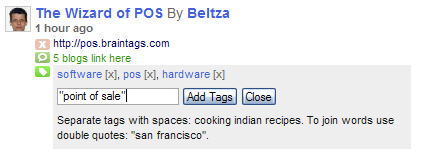
Why am I telling this? Well, this morning I was looking at Technorati’s Favorites function, and noticed that something went wrong. When adding a site to your favorites, you have the posibility to attach tags to that site. The instructions for adding tags are clear:

Separate tags with spaces: cooking indian recipes. To join words use double quotes: "san francisco".

But it doesn’t work that way! When I tried to add “point of sale” as a tag
Technorati tags

The following happened:
Technorati tags

Technorati obviously tried to solve the quoting problem by replacing the quotes, but this change has a nasty side effect. Of course I have contacted Technorati about this issue, and will update this post when they reply.

Brain Links is back

Only a week after I closed down Brain Links, Brain Links is back, albeit in a more simpler form. Before, each link had its own page, with a description and the possibility to comment on the link (which was rarely used). The new Brain Links is only visible as a linkroll on the sidebar of the main page of Brain Tags.

To power Brain Links, I no longer use Movable Type, but created a new widget that fetches the last ten links from my del.icio.us account. There are no archives, no overview, no categories, no comments,… just ten interesting links.

In case somebody also wants to create a del.ico.us widget, this is the code I used:

<div class=“module-delicious module”> <h2 class=“module-header”>Brain Links</h2> <div class=“module-content”> <a href=“http://del.icio.us/beltza"&gt;my del.icio.us</a> </div> </div>

Insert the code above into a new system template called Widget: del.icio.us linkroll, and add the widget to a widget manager. Do not forget to replace beltza with the name of your del.icio.us account!

Performancing for Firefox

After reading the lifehacker desktop blog editor comparison I decided to give performancing for Firefox a try. I am a happy user of Ecto (number three in the comparison), but the performancing editor has WYSIWYG functionality, as well as Technorati and del.icio.us integration.

So I installed the plugin, and am now writing the first post in my new editor. So far I like it. It is easy to use, and it has more than enough functionality.

Performancing

IE7 as an automatic update creates problems for software manufacturers

When its latest stand-alone browser ships in Q4, Microsoft plans to use its patch-distribution mechanism as its primary delivery vehicle. But businesses will be able to control distribution via a Microsoft-provided blocking tool.

Though a new version of the most popular web browser is definitely needed (the rendering engine is more than 6 years old, and there are many security problems) I wonder whether it is a good iedea to push it through the throat of so many people. This is going to lead to a lot of problems.

I am not afraid of websites that suddenly don't look so nice as before or that even stop working. The webmasters of such sites already had the chance to improve that ever since Firefox became popular, and if they still haven't updated their sites they will soon enough as visitors start complaining.

No, the main problem lies in the tight integration with the operating system, and the many third-party applications that make use of IE functionality. Though websites can be updated on a single place to fix the problem for once and ever, this is a lot harder for applications installed on millions of PC's.

A few months ago we have found that some of our applications are incompattible with IE7, giving an ‘Invalid URL format’ error. We quietly started looking for a solution for this problem, expecting that IE7 would be released together with Windows Vista or as an optional download. The announcement that Microsoft is going to push IE7 as an automatic update surely is going to give us some problems, as we are going to have to solve this bug and update all our customers before the end of Q3!

YAR (Yet Another Redesign)

After the succesful redesign of The Wizard of POS, I had gathered some momentum, and continued with the redesign of Brain Tags.

First of all, I reverted back to the basic Movable Type templates, as I had hacked the old templates to a level that made it very difficult to maintain and update. Actually, the latest update to version 3.31 broke my site at several parts.

When all templates were more or lass back to basic, I used the fantastic StyleCatcher plugin to change the look and feel. I selected a style called Make my way from the Movable Type style contest. I know it is not very original, as there mioght be dozens of other blogs using the same style, but it is far better than I ever could make.

This is where it stands now. I still have some minor issues to fix, which will probably be done next week. What do you think about the new Brain Tags?