How I work

After reading the lifehacker How I work series, I thought that it might be interesting to write down my own way of working for the readers of Brain Tags.

What desktop software do you use every day?

As most people I have two sites from where I work: in the office I sell and support the products of ICG software, and at home I run BryteNet, do some web development, blog and keep in contact with me friends all over the world. At both places I use a Windows XP desktop PC, equipped with:

  • Firefox I use the Internet a lot, and have always have some tabs open with sites I want to read whenever I have a spare moment, e.g. when I am on hold. With Internet Explorer I would have my task bar cluttered with screens, but Firefox's tabs keep things organized.
  • ActiveWords Whenever I have to work on a PC without ActiveWords I feel very clumsy. ActiveWords automatically corrects my typing errors, opens my applications, fills in texts and generally saves me a lot of time.
  • Trillian With customers and friends all over the world I use instant messaging all the time. The problem is that everybody uses another application, and the different applications (MSN, ICQ, AOL, Yahoo!, Google Chat,…) do not talk together. Instead of installing a separate client for each protocol, I use Trillian, which 'speaks' all those protocols.
  • Skype Instead of sending messages, it is more efficient to actually talk to somebody. That is where Skype comes in, as I can talk with any other Skype user for free.

In the office:

  • Microsoft Outlook We are a Microsoft shop, so obviously use Outlook. Most of my colleagues use it exclusively for e-mail, but I spend more time in the calendar and tasks. Of course I had to make some adjustments, as the Microsoft way of doing things does not always coincide with my own. So I installed Outlook Quotefix to stop Outlook from top-posting when I reply to messages and to trim the headers in my replies. Furthermore I use the Getting Things Done add-in to streamline my workflow and the LinkedIn toolbar to create contacts directly from people's signatures and to keep them updated when contacts change their LinkedIn profile.
  • Windows Enterprise Desktop Search We have a lot of information scattered over a few places on several servers and of course on my own PC. Windows Desktop Search brings that all together, as I have it index all items in Outlook (mail, tasks, notes, contacts), and all documents (Word, Excel, Powerpoint, HTML and PDF) on my PC and the servers. I use the enterprise edition as it has a much cleaner interface than the MSN edition.
  • ICG Software Of course we have our own applications installed. Not only for giving support, but also for invoicing and tracking customer activity (CRM).
  • Unyte Unyte is a free add-on for Skype that allows you to share an application on your PC with the person(s) on Skype. I use it to give demonstrations, training and support to our foreign customers.

At home:

  • Thunderbird My e-mail client of choice. It is fast and complete. Of course I use the IMAP protocol instead of POP3, so I always have all my important messages on the mail server to be accessed through webmail.
  • Palm Desktop At home I don't need an advanced planner, so this simple (and free!) calendar, task list and contact list fulfills all my needs.
  • Ecto Blogging made easy. A real blogger does not write in small textarea fields, but uses a full blown desktop client.
  • HTML-Kit I used to do my coding work in notepad, but noticed that I needed some more features. Since then I use HTML-Kit to do all my coding.
  • RSS-Bandit To stay up-to-date with what is happening in the world I follow the writings on several web sites. Instead of visiting these sites every day, A read their feeds in RSS-Bandit.

What web sites do you use every day?

Just in terms of raw weekly hours, Google is definitely number one. In addition to regular old searching, I use it for looking up definitions, as a calculator, and for checking stuff like maps and weather. I do love the Google.

Furthermore I use Harvest to track my worked hours.

All other sites enter in RSS-Bandit, which is my dashboard to the world. It shows me tech news, news about my friends, search results on topics I am interested in, comments made on my weblogs, replies to comments I have left on other blogs…

What PDA/personal organizer/system do you use to keep organized?

I have a Palm Zire 31, which I keep synchronized with my two workstations. I always have all information at hand, whereever I go.
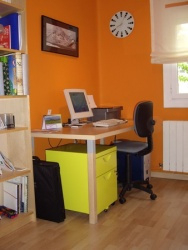
Home office

Barça

FC Barcelona is champion of the ‘Liga’. If you know me only a little bit, you know that I couldn’t care less, right? I only like sports the moment I practice it myself, but do not care about what others are doing. I like playing soccer with friends, though I am a terrible player, but get really bored when looking soccer on the television, to the point that I usually fall asleep.

But when FC Barcelona is involved, I have no choice. Living ‘only’ 160 kilometers from Barcelona means that Barça is part of daily life. It is as simple as that, and there is no way around it! Each and every day they appear on the TV news, whether they are preparing for a big match or simply because the players went for a walk.

Yesterday evening hell broke loose in Lleida. After the match everybody went out on the streets to celebrate the victory. There were fireworks, drums, people shouting and singing, but most of all car horns. The streets in the center had collapsed of all the cars driving around like crazy with Barça flags out of the windows.

I don’t mind what Barça does, but I always appreciate a good party!

Safety instructions

The steward seriously missed his calling. The man was a stand-up comedian, and a dang fine one at that. I haven't laughed so hard in ages. That whole safety thing you have to suffer through every time? He turned it into a comedy routine: “Please pretend to pay attention while we explain the safety features of this Boeing 737. I know, I can't believe it either, but there's a safety card in the seat pocket in front of you. No one ever reads it, so I'm not going to even bother asking you to. At this time, you should have your seatbelts on, your tray tables up, and your seats in their upright and most uncomfortable position. This is a no complaining, no whining, no smoking flight. If you absolutely must smoke, I suggest you avail yourself of our smoking area out on the wing...that is, if you can manage to get it lit. While you're out there, feel free to enjoy our inflight movie, Gone With The Wind. We don't expect a loss of cabin pressure today. If we did, the three of us would have called in sick. But if we do lose pressure, masks will automatically fall from the ceiling. After you're done screaming, simply put the mask on and breath normally, like this: [Darth Vader Imitation]. Please put your own mask on before helping your children...or those who are acting like children, such as your husband. Now, since we've been cleared for take-off, I'd like to ask you to lean over and please press your face against the window so that all those other bankrupt airlines can see that we have a full flight. Neener, neener! And thank you for flying Southwest today. Remember, no one loves you, or your money more than Southwest!"

[Found at: Signal vs. Noise]

Pentax A10

Pentax A10

When we were close to Andorra this weekend, we hopped over the border to do some shopping. We were looking for a new digital camera, and finally bought the Pentax A10. Of all cameras that matched our requirements, small form factor, minimal 3x optical zoom, quality optics system, the Pentax was the only one offering a usefull additional feature: stabilisation. The problem with small cameras is that it is very difficult to hold it steady, especially when using the zoom function. Stabilisation makes sure that pictures are still sharp under these conditions.

The coming days I will try out our new camera, so you might expect some changes on my photo page again.

Job application

Found this piece on OpenBC. If they actually hired this man, they did the right thing.

This is an actual job application that a 75 year old senior citizen submitted to Wal-Mart in Arkansas. They hired him because he was so funny.
NAME: George Martin SEX: Not lately, but I am looking for the right woman (or at least, one who'll cooperate) DESIRED POSITION: Company's President or Vice President. But seriously, whatever's available. If I was in a position to be picky, I wouldn't be applying here in the first place. DESIRED SALARY: $185,000 a year plus stock options and a Michael Ovitz style severance package. If that's not possible, make an offer and we can haggle. EDUCATION: Yes. LAST POSITION HELD: Target for middle management hostility. PREVIOUS SALARY: A lot less than I'm worth. MOST NOTABLE ACHIEVEMENT: My incredible collection of stolen pens and post-it notes. REASON FOR LEAVING: It sucked. HOURS AVAILABLE TO WORK: Any. PREFERRED HOURS: 1:30-3:30 p. m. Monday,Tuesday and Thursday. DO YOU HAVE ANY SPECIAL SKILLS?: Yes, but they're better suited to a more intimate environment. MAY WE CONTACT YOUR CURRENT EMPLOYER?: If I had one, would I be here? DO YOU HAVE ANY PHYSICAL CONDITIONS THAT WOULD PROHIBIT YOU FROM LIFTING UP TO 50 lbs.?: Of what? DO YOU HAVE A CAR?: I think the more appropriate question here would be "Do you have a car that runs?" HAVE YOU RECEIVED ANY SPECIAL AWARDS OR RECOGNITION?: I may already be a winner of the Publishers Clearing House Sweepstakes, so they tell me. DO YOU SMOKE?: On the job - no, on my breaks - no. WHAT WOULD YOU LIKE TO BE DOING IN FIVE YEARS?: Living in the Bahamas with a fabulously wealthy dumb sexy blonde supermodel who thinks I'm the greatest thing since sliced bread. Actually, I'd like to be doing that now. DO YOU CERTIFY THAT THE ABOVE IS TRUE AND COMPLETE TO THE BEST OF YOUR KNOWLEDGE?: Oh yes, absolutely. SIGN HERE: Sagittarius

No CeBIT

CeBIT

After having our own stand on the CeBIT for two years, we have decided not to go this year. The reasons are the high cost of stand space, the length of the show and the decreasing number of business visitors. Though I always liked going to the CeBIT, this decision saves me a lot of time, as I don't have to prepare the stand, and will stay at the office during the two weeks that I normally need for the CeBIT. One of the things I will be doing during these weeks is contacting visitors of our stand during the previous years and polling their interest in our products.

On the other hand, I won't be able to roam around to find interesting new products as the Ultra-Mobile PC. But I will try to spot new POS products through press releases and corporate sites, and publish these on the Point Of Sale weblog.

Trying out Edgeio

Edgeio

Edgeio is a new service to create classifieds directly from your weblog. It automatically organizes entries tagged with listing on the Edgeio site, and allows visitors to search and comment on listings. The concept sounds very interesting to me, so I decided to try it out.

The only thing I have for sale at the moment are web server accounts, so I created three posts on the BryteNet blog describing the three web hosting packages BryteNet currently offers. I tagged all posts with the keyword listing as well as some additional keywords. After that I signed up at Edgeio, claimed my blog and noticed that the posts were already appearing on the site, including a thumbnail made from the image I used in the post. Though they offer the possibility to encode the list price in the blog post as well, I had not mentioned the price, so I edited my Edgeio entries to list the corresponding price. Conclusion: it is very easy to get listed on Edgeio.

After that I went to the customer side of Edgeio, to see how my listings would appear. One great feature of Edgeio is that you can enter your location, and it will filter the listings based on the distance you have chosen with an AJAX slider. I started by putting the slider on 'Lleida' to see only listings from my home town. As expected, there are only a handful of bloggers here, only my own listings showed up.

I moved the slider up to 'Catalonia'. To my surprise, I found that only one other Catalan blogger uses Edgeio, offering jobs in Barcelona. There are quite some bloggers in Catalonia, but apparently none of them has found Edgeio yet. I continued to 'Spain' finding three more offers, bringing the total on an amazing eight!

It is clear that Edgeio is not ready for prime time yet. Though it is easy to get listed, not many bloggers use the service, and therefore it is not worth the effort at this moment to search for listings on Edgeio.

Progress with eZ Publish

I have been playing a little bit more with eZ Publish for the BryteNet site. One little disappointment was that I could not generate friendly URIs like http://brytenet.com/forum/, but I have to work with URIs as http://brytenet.com/index.php?/forum/. According to the eZ people this is because BryteNet has set up PHP as a CGI process and not through Apache’s mod_php, which understands the accept_path_info function. The Brytenet servers implemented PHP as a CGI process for security reasons, and there is no way to change this in an easy way. I still don’t understand why this is such a problem, as other PHP applications such as WordPress are able to produce friendly URIs.

Anyway, maintaining a site’s content with eZ Publish is very easy. I have been able to set up the whole content structure in no-time, and even made some changes to the default templates. Templating is more daunting, as the template language used is very, very complete. For the moment I have only made some small changes, and have concentrated myself on the actual contents of the site.

Today I also created a Dutch version of the BryteNet site, which was done within 5 minutes! Now I am translating all content, which is done in a very clever way. A single object (text, folder, image,…) can have several translations, and depending on the way you access this object, one version or the other is shown. So going to http://brytenet.com gives me the default (English) view of the home page, while http://nl.brytenet.com will show me the Dutch view of the same object. Very neat! I still have to translate the FAQ section, which for the moment will show the default language, even if I request the Dutch view.

When all has been translated into Dutch, I will add Spanish and Catalan too. And probably about the same time I will start tweaking my templates to change the components shown and the layout of the pages. The nicest job, making a unique design for this site, I will keep for the last, as it is the most logical order, and to have something to work to.

BryteNet has new clothes

Brytenet

The last weeks I have been very busy with the new BryteNet site. The old site had been created in a couple of minutes 'just to have something', and never changed afterwards. It was really time for a complete site overhaul. When planning the datacenter move, I decided not to restore the old site, but to put a simple page with the main properties of the hosting packages and contact information instead. That gave me the chance to built the new site properly.

ClientExec

My first concern were the existing users of the server. I quickly installed ClientExec and created accounts for all users, so they can manage their helpdesk tickets and billing information. Installation was very easy, and within an hours I had everything set up. I still want to change the templates to fit in the new BryteNet style, but that can wait 'till later. I did modify the template to include the Google Analytics code. After all, I still want to know what is going on…

It's a Small Place

The next step was to restore the BryteNet weblog. Since the new server has Fantastico installed, I only had to fill in some details, and WordPress was installed. I copied the plug-ins I used to the right place and restored the database to get the old content, and I was finished. 29 minutes was all I needed!

eZ Publish

For the rest of the site I had chosen the eZ Publish CMS. While eZ Publish is probably way too big for such a small site, I wanted to use it for its execllent multi-language support and since it can do literally anything. So I can manage all aspects of the site (product information, contact forms, customer forum,...) with a single tool. eZ Publish also has a weblog module, but for the moment I have chosen to stick with WordPress.
I had looked at eZ Publish before, and have big plans for it for future projects, but without a concrete implementation, it is difficult to find out what the possibilities and limitations of this CMS are.

Installation was a breeze, and I have been able to activate the features I wanted to use at the moment. The templating system is very powerful, though I find it still difficult to find the right template when I want to change a part of a page-layout.

A little disappointment was that eZ Publish is not able to generate friendly URI's when PHP is implemented as CGI rather than with mod_php. For security reasons PHP is run through CGI on the BryteNet servers, resulting in the appearance of index.php? in the middle of the URI. It is something I will have to live with…

Another problem I still have to solve is that the automatically generated menus only contain folders, and I haven't found a way yet to include links outside eZ Publish in the menu. I have found something on the subject in the eZ forums, and will tackle this problem soon enough.

Design

The next big thing I am going to work on is to give BryteNet an unique face. At the moment the three components of the BryteNet site (eZ Publish, ClientExec and WorkPress) still use their default design, which I only modified a little bit. I om going to generate a completely new stylesheet for those sites, so they will have more or less the same look. I started my work with designing a new logo, and am now working on the colour scheme. I have some ideas on how the result will be, but am still experimenting with those ideas.

Stay tuned for more news…

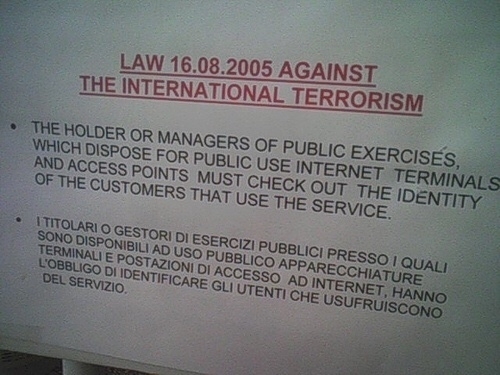
Limited access

Limited access

I have to identify myself in order to get Internet access?! How on earth do they think to stop terrorism by asking for identification for terminal access, while I can have a wireless connection without identifying myself?